
@yoltra/devtools-cli
Terminal UI for Yoltra DevTools: inspect stores from the command line.
@yoltra/devtools-cli is a React + Ink terminal application that embeds a DevTools hub and
renders a full-featured TUI for inspecting Yoltra stores. Useful when you would rather keep the
inspector in a terminal, or in an SSH session where a browser is not available.
#Installation
npm install -g @yoltra/devtools-cliOr run directly:
npx @yoltra/devtools-cli#Quick Start
# Start the CLI (auto-starts hub on port 9800)
npx @yoltra/devtools-cli

# Custom port and history size
npx @yoltra/devtools-cli --port 8900 --history-size 2000

# A hub that requires a token (the panel presents the same one)
YOLTRA_DEVTOOLS_TOKEN=s3cret npx @yoltra/devtools-cli
Then connect your app's store to that hub. transport: "websocket" sends it to the hub even when
the browser extension is installed:
import { withDevtools } from "@yoltra/devtools-browser-agent";

withDevtools(store, { port: 9800, transport: "websocket" });
The CLI will display connected stores and live event data.
#Features
- Embedded DevTools hub (auto-starts, skips if one is already running)
- Tabbed store selector for multiple connected stores
- Event timeline with channel/type display
- Interactive state tree explorer
- Time travel through the recorded events, for a store that allows replay
- Subscriptions panel (reducers, effects, middleware)
- Performance metrics dashboard
- Event emitter for injecting test events
- Keyboard navigation with focus management
#Panels
Six panels, in this order. There are no per-panel shortcuts: Tab moves to the next panel and
Shift+Tab to the previous one.
| Panel | Description |
|---|---|
| Events | Live event stream with channel, type, and timestamp |
| State | Collapsible state tree with current values |
| Time Travel | Scrub the recorded events; only for a store that allows replay (allowReplay) |
| Subscriptions | Registered reducers, effects, middleware |
| Metrics | Event count, rate, processing time, queue depth |
| Emit | Compose and emit events to the selected store |
| Key | Action |
|---|---|
Tab / Shift+Tab | Next / previous panel |
] / [ | Next / previous connected store |
← / → | On Time Travel: step one event back / forward |
r | On Time Travel: resume live state |
q | Quit |
Esc | On Emit: leave the form, so the keys above work again |
Enter | On Emit, outside the form: back into it |
The Emit form takes the keyboard when its tab opens. While a field has focus, every key above is
typed into it, so a payload such as ["a"] or a channel with a q in it is safe to enter.
#CLI Options
| Flag | Default | Description |
|---|---|---|
--port | 9800 | Hub server port |
--history-size | 1000 | Max events retained for late-connecting clients |
--token | none | Token the hub requires of every client |
--token can also come from the YOLTRA_DEVTOOLS_TOKEN environment variable, which keeps it out
of the process list; the flag wins when both are set. The embedded hub requires the token, and the
terminal panel presents it, so the same value also lets the CLI attach to a hub already running
with it. Pass the same token to each store agent (authToken).
These symbols are exported too (parseArgs, CliArgs, CliArgsError, DEFAULT_PORT,
DEFAULT_HISTORY_SIZE, TOKEN_ENV), so a tool that embeds the hub can reuse the same argument
contract instead of deriving it again.
#How It Works
┌──────────────┐     ┌──────────────┐     ┌──────────────┐
│  Your App    │     │  CLI         │     │  Ink TUI     │
│  (with       │ WS  │  (embedded   │     │  (React +    │
│  withDevtools│────►│   hub)       │────►│   Ink)       │
│  )           │     │              │     │              │
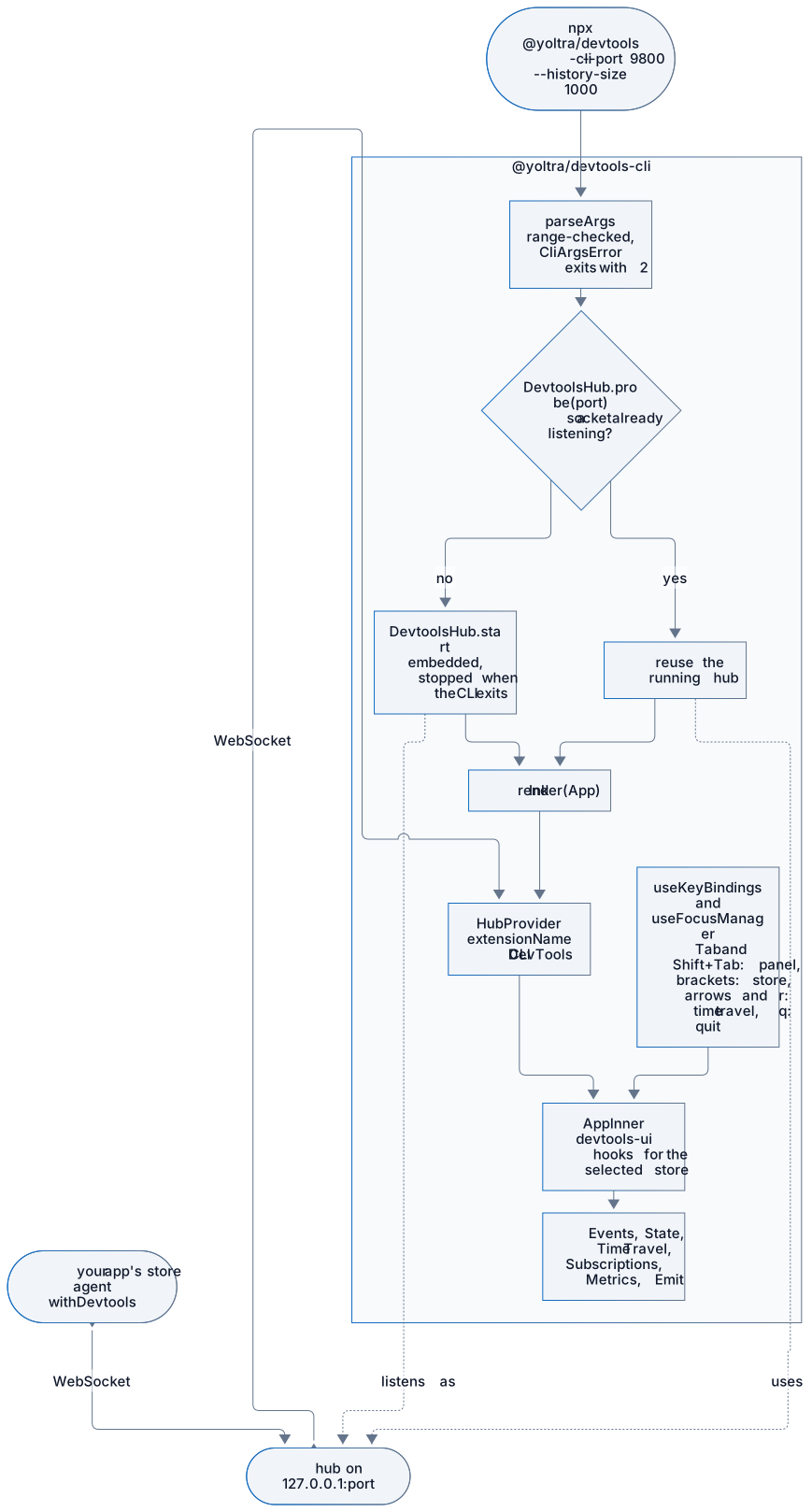
└──────────────┘ └──────────────┘ └──────────────┘- The CLI starts an embedded
DevtoolsHub(or detects an existing one viaprobe()) - The Ink TUI connects to the hub as an extension using
@yoltra/devtools-uihooks - Your app's store agent connects to the hub via WebSocket
- Events, state, and commands flow through the hub in real time
The CLI is two things in one process: an optional hub and a panel. It starts the hub only when
DevtoolsHub.probe finds nothing listening on the port, and the terminal UI always connects as a
regular extension through HubProvider, so it behaves the same against its own hub or one
already running.

#Architecture
| File | Responsibility |
|---|---|
index.ts | CLI entry point, argument parsing, hub lifecycle |
app.tsx | Root Ink component with HubProvider |
components/StoreTabs.tsx | Tabbed store selector |
components/EventTimeline.tsx | Terminal event log |
components/StateTree.tsx | Collapsible state tree |
components/SubscriptionsPanel.tsx | Subscription inventory |
components/MetricsDashboard.tsx | Performance counters |
components/EventEmitter.tsx | Event composition form |
components/StatusBar.tsx | Connection status bar |
hooks/useKeyBindings.ts | Keyboard shortcut management |
hooks/useFocusManager.ts | Focus cycling between panels |
#Related Packages
- @yoltra/devtools-server: The hub embedded by this CLI
- @yoltra/devtools-ui: React hooks powering the TUI logic
- @yoltra/devtools-protocol: Wire format for hub communication
- @yoltra/devtools-browser-agent: Agent for connecting browser stores
- @yoltra/devtools-ext: Browser extension, as an alternative
#License
MIT: Free to use in commercial and open-source projects.
Report a problem with this page