
@yoltra/devtools-server
Central WebSocket hub that brokers DevTools protocol traffic between Yoltra stores and extensions.
@yoltra/devtools-server runs a localhost-only WebSocket server that handles protocol
handshakes, routes messages between stores and DevTools UIs, and maintains a ring buffer of
recent events for late-connecting extensions.
#Installation
npm install @yoltra/devtools-server#Quick Start
#As a library
Embed the hub in your own process (test runner, dev server, VSCode extension):
import { DevtoolsHub } from "@yoltra/devtools-server";

const hub = new DevtoolsHub({ port: 9800 });
await hub.start();

console.log("Hub listening on ws://127.0.0.1:9800");
console.log("Connected stores:", hub.storeCount);
console.log("Connected extensions:", hub.extensionCount);

// Later...
await hub.stop();#As a standalone CLI
npx @yoltra/devtools-server --port 9800 --history-size 1000To require a token of every client, pass --token <secret> or set YOLTRA_DEVTOOLS_TOKEN, which
keeps it out of the process list; the flag wins when both are set. Give the same value to each
store agent and panel as authToken.
YOLTRA_DEVTOOLS_TOKEN=s3cret npx @yoltra/devtools-server --port 9800Or via the project binary:
node ./bin/devtools-server.js --port 9800#How It Works
┌─────────────┐      ┌──────────────┐      ┌───────────────┐
│  Yoltra     │ ──── │  DevTools    │ ──── │  DevTools UI  │
│  Store      │  WS  │  Hub         │  WS  │  (Extension)  │
│             │ ───► │  (this pkg)  │ ───► │               │
└─────────────┘      └──────────────┘      └───────────────┘
                          │
                     Ring Buffer
(event history)- Stores connect and perform a protocol handshake
- Store events are fanned out to all connected extensions
- Extension commands (state requests, time travel) are routed to the target store by
storeId - Recent events are buffered in a ring buffer so late-connecting extensions receive history
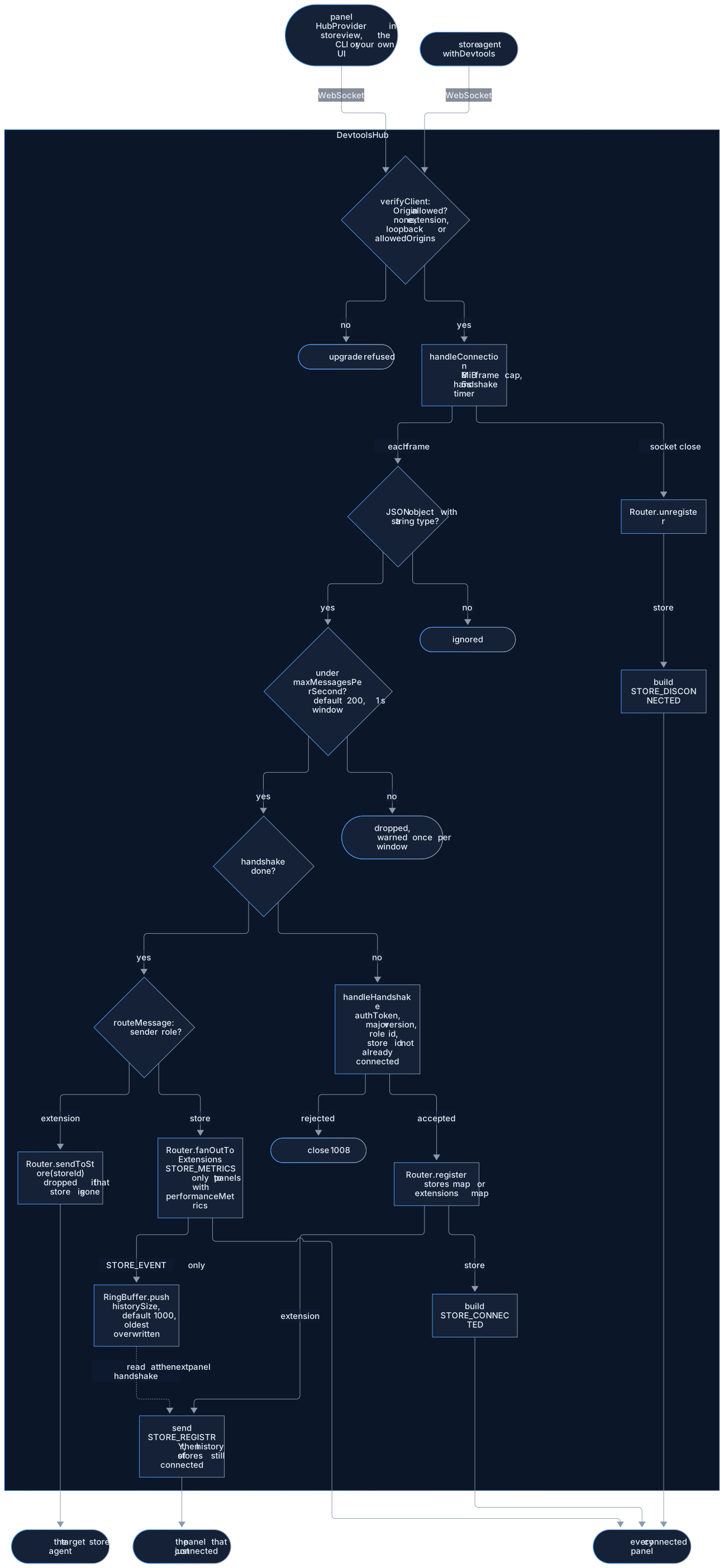
Inside DevtoolsHub, every frame passes the same gates (origin, shape, rate, handshake) before
the Router sees it. A store frame fans out to every panel, and a STORE_EVENT is also kept in
the RingBuffer; a panel command goes to exactly one store, chosen by storeId.
A store id belongs to one connection at a time. A store presenting an id that is already connected
is refused with a handshake error naming the id, and its agent keeps retrying until the first
store leaves. Agents use the store's name when no storeId is given, so two stores with the same
name need distinct storeId values to be inspected side by side.

#Configuration
interface DevtoolsHubOptions {
  /** Port to bind on. @default 9800 */
  port?: number;
  /** Host to bind on. @default "127.0.0.1" */
  host?: string;
  /** Maximum events retained for late-connecting extensions. @default 1000 */
  historySize?: number;
}#API Reference
#DevtoolsHub
| Method / Property | Description |
|---|---|
new DevtoolsHub(opts?) | Create a hub instance |
hub.start() | Start the WS server (returns a Promise) |
hub.stop() | Stop the server and close all connections |
DevtoolsHub.probe(port) | Check if a hub is already running on a port |
hub.storeCount | Number of connected stores |
hub.extensionCount | Number of connected extensions |
hub.historySize | Number of events in the ring buffer |
#RingBuffer<T>
A fixed-size circular buffer used internally for event history:
import { RingBuffer } from "@yoltra/devtools-server";

const buf = new RingBuffer<string>(100);
buf.push("event-1");
buf.push("event-2");
buf.toArray(); // ['event-1', 'event-2']
buf.size; // 2
buf.clear();#Probe Before Starting
Avoid port conflicts by checking if a hub is already running:
import { DevtoolsHub } from "@yoltra/devtools-server";

const alreadyRunning = await DevtoolsHub.probe(9800);

if (!alreadyRunning) {
  const hub = new DevtoolsHub({ port: 9800 });
  await hub.start();
}#Security
The hub binds to 127.0.0.1 (localhost only) by default. This is a deliberate v1 security
constraint: the hub is not exposed to the network.
#Related Packages
- @yoltra/devtools-protocol: Wire format and message types
- @yoltra/devtools-browser-agent: Connects browser stores to this hub
#License
MIT: Free to use in commercial and open-source projects.
Report a problem with this page