
@yoltra/devtools-storeview
React DOM UI for Yoltra DevTools: the visual store inspector.
@yoltra/devtools-storeview provides a full-featured React application for inspecting Yoltra
stores in real time. It renders event timelines, state trees, subscription graphs, performance
metrics, time-travel controls, and an event emitter. Used by both the browser extension panel and
the VSCode webview.
#Installation
npm install @yoltra/devtools-storeviewPeer dependencies: react ^18, react-dom ^18
#Quick Start
#Mount into a DOM element
import { mountDevtools } from "@yoltra/devtools-storeview";

const container = document.getElementById("root")!;

const unmount = mountDevtools(container, {
  port: 9800,
  extensionName: "My DevTools",
  autoReconnect: true,
});

// Later...
unmount();
When the hub was started with a token, pass the same value as authToken; the hub refuses a
panel without it.
#Use as a React component
import { DevtoolsApp } from "@yoltra/devtools-storeview";

function MyPanel() {
  return <DevtoolsApp config={{ port: 9800, extensionName: "My Panel" }} />;
}#Panels
The app provides four tabs, each backed by hooks from @yoltra/devtools-ui:
| Panel | Description |
|---|---|
| Inspector | Event timeline (filter by channel/type and committed/uncommitted status; an event that did not commit is labelled with its reason, such as vetoed: authGuard, naming the middleware when it has a name) with per-event detail (changed paths, patches) plus an ad-hoc Emit composer |
| State | Interactive JSON tree explorer with live state updates and manual refresh |
| Time Travel | Step through event history, jump to any index, resume live mode |
| Metrics | Store metrics dashboard (reduce timing, dedup hits, queue depth) plus the reducer/effect/middleware subscriptions inventory |
#Layout
┌─────────────────────────────────────────────┐
│  TopBar  (store selector + connection dot)  │
├─────────────────────────────────────────────┤
│  TabBar  (Events | State | Subscriptions…)  │
├─────────────────────────────────────────────┤
│                                             │
│            Active Panel Content             │
│                                             │
├─────────────────────────────────────────────┤
│  BottomBar  (connection status)             │
└─────────────────────────────────────────────┘#How It Works
DevtoolsApp holds no protocol logic of its own: it wraps HubProvider from
@yoltra/devtools-ui, runs that package's hooks for the selected store, and passes the results
to presentational panels. Which tabs appear is decided by the store's advertised capabilities, so
a store that cannot replay never shows a Time Travel tab.
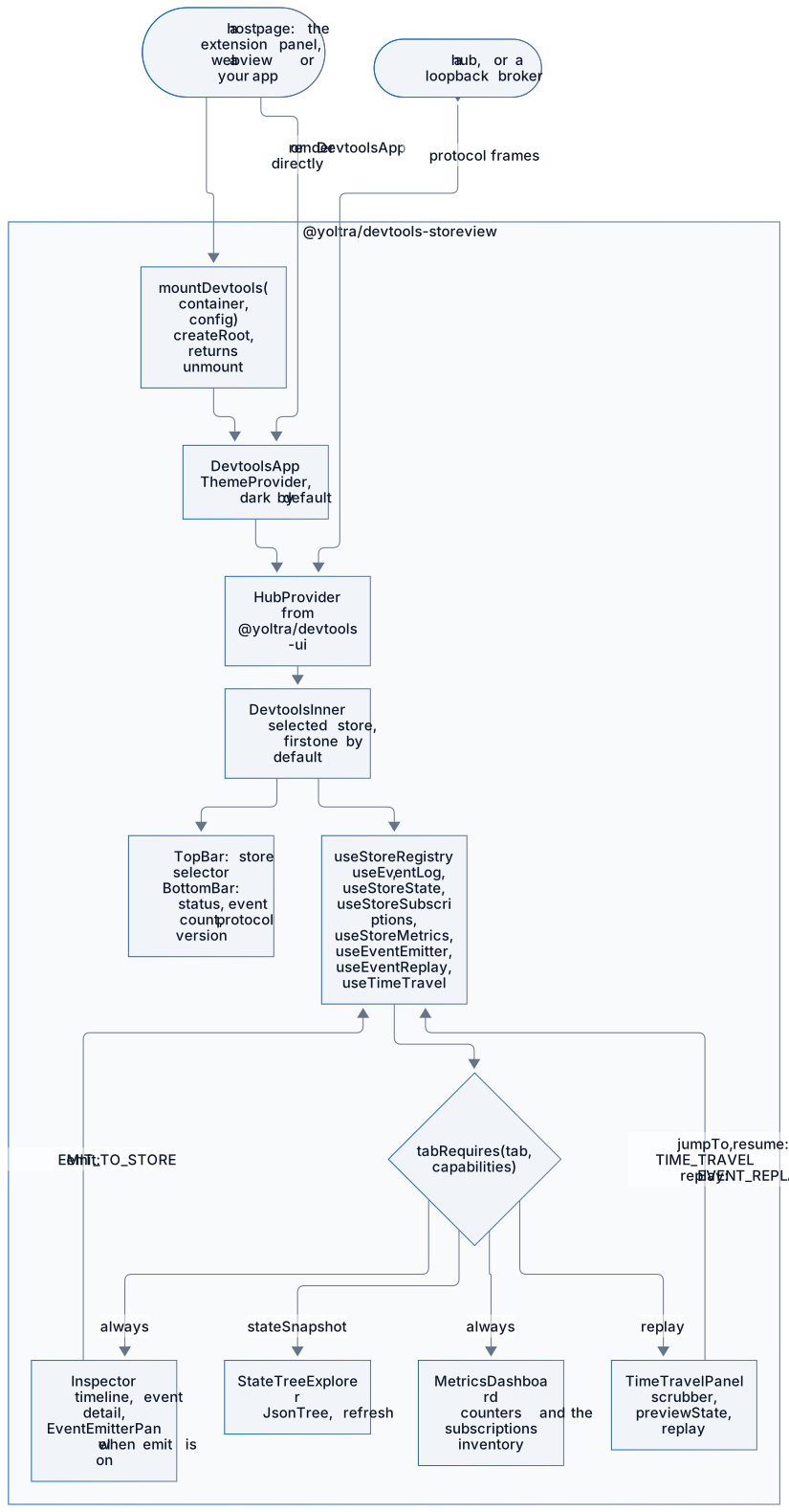
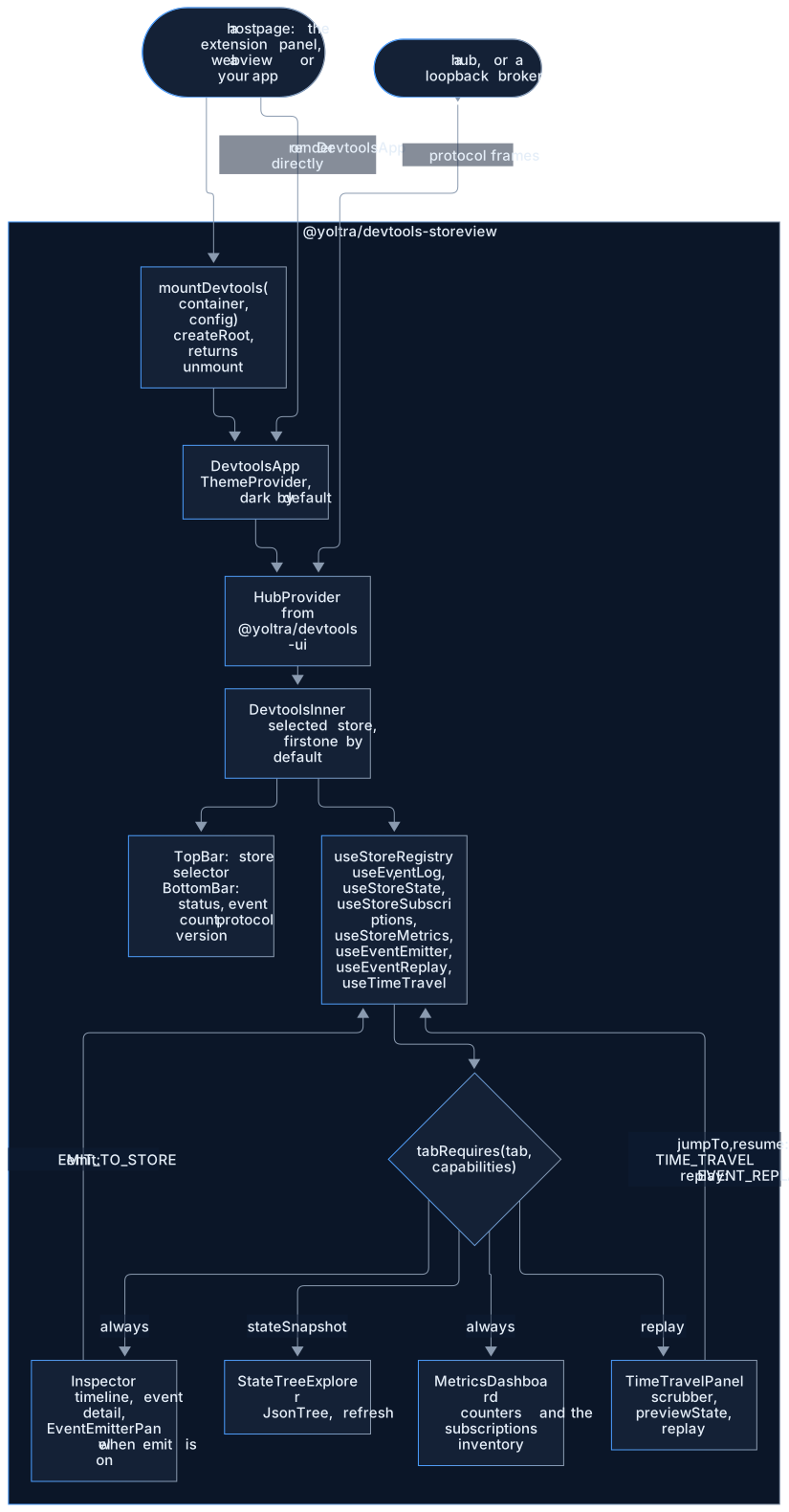
On a store switch, resolveTab keeps the current tab only if the new store still supports it,
and falls back to Inspector otherwise.
#Exported Components
#Mount API
| Export | Description |
|---|---|
mountDevtools(container, config) | Mount the full app into a DOM element, returns unmount() |
DevtoolsApp | Root React component with HubProvider included |
#Layout
| Export | Description |
|---|---|
TopBar | Store selector dropdown with connection indicator |
BottomBar | Connection status bar |
#Panels
| Export | Description |
|---|---|
EventTimeline | Event log with filtering and detail inspection |
StateTreeExplorer | Collapsible JSON state tree with refresh |
SubscriptionsPanel | Reducer/effect/middleware/subscription tables |
TimeTravelPanel | Event history scrubber with step/jump/resume |
EventEmitterPanel | Form for composing and emitting events |
MetricsDashboard | Performance counters and real-time stats |
#Shared
| Export | Description |
|---|---|
JsonTree | Recursive JSON tree renderer |
FilterBar | Text and toggle filter controls |
ConnectionDot | Colored status indicator |
#Theming
The app uses CSS Modules with CSS custom properties. A VSCode-compatible theme is provided at
styles/vscode-theme.css for embedding in webview panels.
#Related Packages
- @yoltra/devtools-ui: Hooks and logic this UI is built on
- @yoltra/devtools-protocol: Wire format and message types
- @yoltra/devtools-ext: Browser extension that mounts this app
#License
MIT: Free to use in commercial and open-source projects.
Report a problem with this page